
A Molded Case Circuit Breaker (MCCB) is a robust device designed to protect electrical circuits from overloads and short circuits. However, in modern industrial automation and complex power distribution networks, a standalone MCCB is often not enough. To achieve remote monitoring, automated control, and enhanced safety, engineers rely on a suite of MCCB accessories.
These accessories transform a standard thermal-magnetic or electronic breaker into an “intelligent” component of a larger power management system. Whether you are managing a factory in a major manufacturing hub or designing a distribution board for a commercial high-rise, understanding these add-ons is critical for system reliability.
Internal Accessories: Signaling and Remote Tripping
Internal accessories are installed directly inside the MCCB housing. They allow the breaker to communicate its status to a Control Room (PLC/SCADA) or react to external electrical signals.
Auxiliary Contact (AUX)
The Auxiliary Contact is perhaps the most common accessory. It is a secondary set of contacts that mirrors the position of the main MCCB contacts.
Function: It provides a signal to a remote indicator or control system (like a PLC) to show whether the breaker is “ON” or “OFF.”
Application: Used for status monitoring in industrial control panels.

Wire-type Auxiliary Contact (AUX)
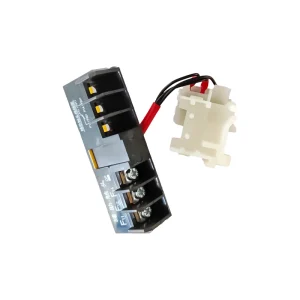
Terminal-type Auxiliary Contact (AUX)
Alarm Contact (AL)
While similar to the auxiliary contact, the Alarm Contact serves a specific safety purpose.
Function: It only changes state when the MCCB has tripped due to a fault (overload or short circuit) or via a shunt trip. It does not move when the breaker is manually turned off.
Application: Vital for triggering audible alarms or visual “Fault” lights on a dashboard.

Wire-type Alarm Contact (AL)

Terminal-type Alarm Contact (AL)
Shunt Trip (SHT)
The Shunt Trip allows the MCCB to be tripped remotely by applying a specific voltage to the accessory’s coil.
Function: When energized (usually by a push-button or a relay signal), the shunt trip mechanically forces the MCCB to trip.
Application: Essential for Emergency Power Off (EPO) systems, where a single button must shut down multiple machines.
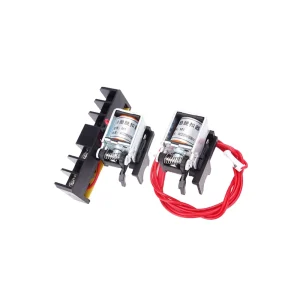
Undervoltage Release (UVR)
Unlike the shunt trip, which trips the breaker when power is applied, the Undervoltage Release trips the breaker when the voltage drops below a certain threshold (usually 35% to 70% of the rated voltage).
Function: It prevents equipment from restarting automatically when power is restored after a blackout, or protects motors from damage caused by low-voltage conditions.
Application: Used for machinery safety and protecting sensitive inductive loads.

External Accessories: Operation and Installation
External accessories are mounted on the outside of the MCCB to facilitate manual operation, remote automation, or physical safety.
Motor Operator (MO)
The Motor Operator is a motorized mechanism that mounts to the front of the MCCB.
Function: It allows the user to remotely “Close,” “Open,” or “Reset” the circuit breaker via an electrical signal.
Application: Essential for Automatic Transfer Switches (ATS) and remote power management in unmanned substations.
Rotary Handles (Direct and Extended)
Standard MCCB toggles can be difficult to operate through a cabinet door. Rotary handles provide a more ergonomic solution.
Direct Rotary Handle: Mounted directly on the breaker inside the cabinet.
Extended Rotary Handle: Features a shaft that extends to the cabinet door, allowing the operator to turn the breaker on or off without opening the door.
Safety Feature: Most handles include a “Padlock” feature to meet Lockout/Tagout (LOTO) safety requirements during maintenance.
Mechanical Interlock
When two MCCBs are used in a dual-power supply system (e.g., Utility vs. Generator), a Mechanical Interlock is mandatory.
Function: It physically prevents both breakers from being “ON” at the same time, avoiding a short circuit between two power sources.
Application: Critical for manual or semi-automatic transfer systems.
Installation and Connection Accessories
To ensure long-term reliability and compliance with IEC 60947-2 standards, proper connection accessories are required.
| Accessory | Function | Industry Insight |
|---|---|---|
| Terminal Shields | Provides "Finger-safe" protection (IP20). | Mandatory in many regions to prevent accidental contact with live parts. |
| Phase Barriers | Increases the insulation distance between phases. | Essential for high-voltage or high-vibration environments to prevent arcing. |
| Extended Terminals | Allows for larger cable sizes or multiple cable connections. | Crucial for high-amperage MCCBs (above 400A) where standard lugs are insufficient. |
| Plug-in / Draw-out Base | Allows for quick replacement of the breaker without disconnecting wires. | Minimizes downtime in critical "One-stop" procurement and maintenance service models. |
Technical Standards and Selection Guidance
When selecting accessories for your product catalog or specific project, keep the following engineering principles in mind:
Voltage Compatibility: Ensure that the control voltage for Shunt Trips, UVRs, and Motor Operators matches your control circuit (e.g., 220VAC, 110VAC, or 24VDC).
Internal Space Constraints: Most MCCBs have a limited number of “slots” for internal accessories. For example, you may be able to fit an AUX and an AL, but adding a UVR might require a larger frame size.
Brand Consistency: Accessories are rarely cross-compatible between manufacturers. Always use accessories designed specifically for the breaker’s series (e.g., DLM1 or DLM3 series) to ensure mechanical alignment.
Environmental Conditions: For maritime or high-humidity environments, look for accessories with tropicalized coils or higher IP-rated covers.
Frequently Asked Questions (FAQs)
1. Can I install a Shunt Trip and an Undervoltage Release in the same MCCB?
In most compact MCCB frames, there is only one slot for a tripping accessory. Therefore, you usually have to choose between a Shunt Trip and a UVR. However, larger frame breakers (above 630A) may allow for both.
2. What is the difference between an Auxiliary Contact and an Alarm Contact?
The Auxiliary Contact follows the handle: if you turn the breaker off manually, the AUX contact changes state. The Alarm Contact only changes state if the breaker trips due to a fault.
3. Do I need a motor operator for a CB-Type ATS?
Yes. A CB-Type (Breaker-based) ATS requires motor operators on both breakers so that the controller can switch between power sources automatically.
Conclusion
MCCB accessories are the key to building a safe, smart, and responsive electrical network. By selecting the right combination of signaling contacts, remote tripping devices, and mechanical interlocks, you can significantly reduce downtime and improve site safety.
When preparing your technical files or request lists for a project, always verify the compatibility of these accessories with your breaker frame size to ensure a seamless installation.
Optimize Your Electrical Infrastructure Are you looking for a complete range of MCCBs and factory-fitted accessories? We provide high-quality electrical components with full CE certification and technical support.
[Contact our engineering team today for a technical consultation or a custom quote.]
Table of Contents
Have you Any Questions?
Can’t find an answer to your question, or want more information about our products? If so, please feel free to get in touch with our professional team. We’re here to help you drive your projects to success.